iSCSI
Workbook 2, chapter 6 (providing remote block storage), page 145.
A quick Google yields https://www.thomas-krenn.com/en/wiki/ISCSI_Basics and man iscsiadm.
- Target iSCSI server
- Initiator iSCSI client
- Node server
- iQN
iqn.YYYY-MM.com.reversed.server.fqdn:optional_name - ACL uses iQN
- LUN - Logical Unit Number
- Portal
172.25.0.11eth0eth1eth3 - Discovery
iscsiadm -m discovery -t send_targets -p 10.10.10.10@salikov example
Login
- iSCSI still uses CDB (Command Descriptor Block) command set originally defined by the original SCSI standards.
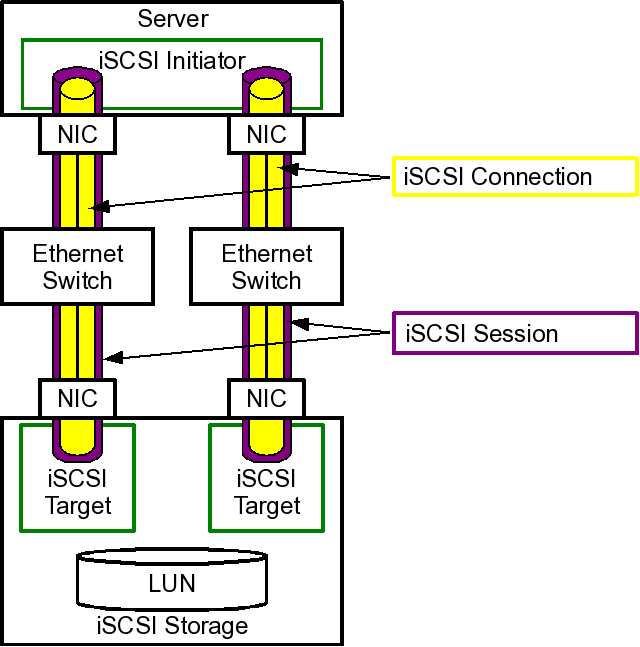
iSCSI Server
yum install targetcli
[root@server9:~] $ targetcli
/> ls
firewall-cmd --add-port=3260/tcpfirewall-cmd --add-port=3260/tcp --permanentsystemctl endable targetsystemctl start target
iSCSI Client
-
yum install iscsi-initiator-utils -
echo "InitiatorName=iqn.2016-09.com.example.desktop9:optional_name" > /etc/iscsi/initiatorname.iscsi- systemctl restart iscsid` - only necessary if you changed the initiator name after doing a scan
- systemctl restart iscsi`
-
iscsiadm -m discovery -t st -p 172.25.N.11- Caches persistently into
/var/lib/iscsi/nodes/
- Caches persistently into
-
iscsiadm -m node -T iqn.2016-09.com.example.server9:optional_name -p 172.25.N.11 -lto login to tagret iQN at portal address -
iscsiadm -m sessionto show establisted iSCSI sessions -
lsblk -o +UUIDto show the new block device (check under/sys/block/) -
Partition and format the new block device.
-
Add filesystem using UUID to
/etc/fstab. -
You can logout and remove the iSCSI disk permanently if you wish using
iscsiadm -m node -T iqn.2016-09.com.example.server9:optional_name -p 172.25.N.11 -o delete
NetworkMangler
Workbook 2, chapter 1 (managing ipv6 networking), page 1.
- Relies on
NetworkManagersystemd service. nmcli,nmtui,nm*/etc/sysconfig/network-scripts/ifcfg-*/etc/NetworkManagerhostnamectl
Postfix
Workbook 2, chapter 5 (configuring email transmission), page 134.
postconf -e "local_transmission=error: local delivery disabled"postconf -e "relayhost=smtpX.example.com"postconf -e "inet_interfaces=loopback-only"postconf -e "mynetworks="127.0.0.1/8 [::1]/128"postconf -e "myorigin=desktopX.example.com"postconf -e "mydestination="systemctl restart postfix